Description: Review the closing tickets portion of the End of Day process on Shift4 Dine below.
To watch more how-to videos, visit our video section.
Manager Process
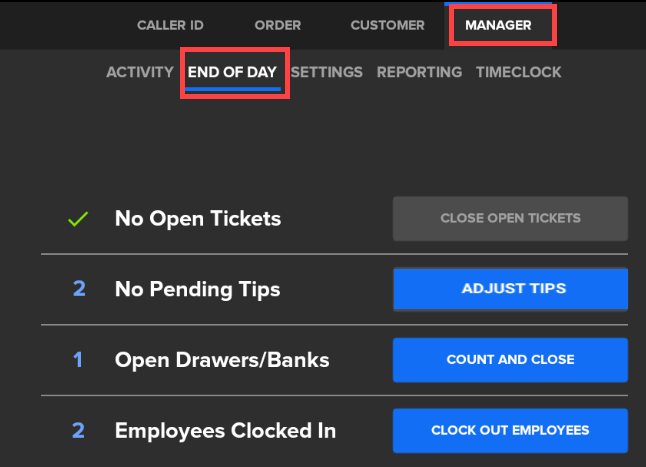
To find this screen, navigate to Manager > End of Day.
Tickets
An employee cannot clock out of the system unless all tickets are closed out. If a user forgets to clock out, there is the possibility there are still tickets or online orders open on the Workstation.
- Tap Close Open Tickets to go to the Open Tickets screen.
- From here, select Show All to view every employee's tickets.
- Select the ticket. You can transfer it to another user, void it, or select Take Payment. For additional information on opening additional tickets, refer to Manage Tickets on Shift4 Dine.
- Select the ticket displayed and then select Open Ticket. You can take payment, void items, remove or restore taxes, and print the guest check receipt using the Print button.
- If the location has online ordering, ensure no online orders are assigned to the employee in the Order > Online Orders section. Ensure online orders are completed.
Closing Drawer/Bank With Open Tickets on Workstation
You can still close out the drawers/banks if there are open tickets on the Workstation. However, employees need to close out open tickets on the Workstation for them to be able to clock out.
Employee Process
- Open your dashboard by tapping on your name in the upper right corner of the screen.
- Tap the Close Open Tickets button to go to the Open Tickets screen.
- Tap on the ticket displayed and then tap Open Ticket.
- Here, you can transfer your ticket to another user, void the ticket, or tap Take Payment. Refer to Manage Tickets on Shift4 Dine for additional information. Follow this process for additional open tickets.
- If the location has online ordering, ensure no online orders are assigned to the employee in the Order > Online Orders section. Ensure online orders are completed.
- Once all tickets are closed, return to your employee dashboard.
Comments
0 comments
Please sign in to leave a comment.