Description: Learn about the latest scale integration enhancements in SkyTab POS and verify your hardware and menu settings to ensure accurate, National Type Evaluation Program (NTEP) aligned performance.
Note: The configurations below depend on your scale hardware. Please contact Support if you have any questions.
Setting up a scale for the first time?
Visit Set Up and Use National Type Evaluation Program Certified Scales for new merchants.
Overview
Use this guide if you previously used a scale with SkyTab POS and are upgrading to version 1.119.0 or higher. This release improves accuracy, reliability, and ease of setup, helping you confidently sell products by weight while ensuring your system performs to the highest standards of precision.
Supported Setup
To take advantage of the upgraded scale integration, ensure your system meets the following requirements:
- For U.S. Merchants using pounds (lb) and ounces (oz)
- SkyTab POS version 1.119.0 or higher
- CAS PD-II scale model (the supported and verified device for this integration)
While other certified scales may connect, optimal performance and support are provided with the CAS PD-II model.
Not Included in the Current Upgrade
The scale integration upgrade does not yet extend to:
- International merchants
- Metric measurements (grams or kilograms)
- SkyTab POS versions below 1.119.0
- Kiosk devices
- Merchants selling bundled items (e.g., “3 for $1.00”)
- Merchants using unit-based discounts (e.g., “$0.10 off per pound”)
These use cases may be supported in future updates as we continue to expand our scale integration capabilities.
What This Means for You
This upgrade enhances your ability to sell items by weight with confidence. By using the supported scale and ensuring your POS version is up to date, your business benefits from:
- Faster checkout times
- Consistent, certified weight readings
- Reduced manual intervention
- Automatic safeguards to prevent setup errors
Together, these improvements make it easier to manage weight-based sales and keep your operations running smoothly.
National Type Evaluation Program (NTEP) Aligned Improvements
While this release focuses on functional improvements, it also aligns with NTEP-certified standards that govern commercial weighing devices in the United States. NTEP ensures accuracy and consistency in how scales communicate weight data for commerce.
By meeting these standards through the supported configurations, SkyTab POS and the CAS PD-II scale combination continue to operate within approved guidelines, meaning your transactions are both precise and compliant without requiring extra steps from you.
In short, you don’t need to think about NTEP; our integration already does.
Scale Integration Update Guide
Verify Hardware Settings
- Navigate to Manager > Settings > Hardware.
- Ensure Use Weight Scale is toggled on.
- Confirm that CAS PD-II is selected in the dropdown list (it should appear by default).
- Select Save.
Confirm Your CAS-PD II Scale Type
The CAS PD-II scale must be configured to Type 5 to communicate properly with your POS. It likely already is, but ensure so by:
- Turn the power off.
- Hold the # key while turning the scale back on.
- The current Type will appear on the display.
- If necessary, select the lb/oz button until Type 5 appears.
- Select Zero to save.
Update Existing Menu Items
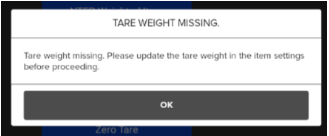
Existing weighted items remain active but may need an update if they previously stored a tare value. (Prior versions didn’t store the tare unit (lb/oz), so manual confirmation is required if you use tares.)
To Update an Item’s Tare Weight:
- Go to the item’s settings.
- Select the blue Tare Weight button.
- Place the empty container on the scale and save.
- Select Save again to finalize the item.
If this step is skipped, users will see an error when attempting to ring in a weighted item during order entry.
Before Opening
- Verify each weighted item functions properly on the POS.
- Check for any error messages when ringing up test items.
Comments
0 comments
Please sign in to leave a comment.